

What Is ATS and How to Write an ATS Friendly CV in 2026
Research Methodology
Information in this guide was verified using official developer and technical specifications from major Applicant Tracking Systems (Workday, Taleo, Greenhouse, iCIMS, Lever, BambooHR) and hiring best practices published by leading global recruitment agencies. Formatting recommendations reflect 2026 parser updates.
Last Fact-Checked: June 1, 2026
If you have ever applied for a job online and heard nothing back, there is a good chance your CV was read by software before any human saw it.
That software is called an Applicant Tracking System, or ATS for short.
Most people either have no idea what it is or have been told scary things about it that are not entirely accurate. This guide explains what ATS actually does, what it does not do, and what you genuinely need to do to make sure your CV gets through it.
What ATS Actually Is — And What It Is Not
An ATS is software that companies use to collect, organise, and manage job applications.
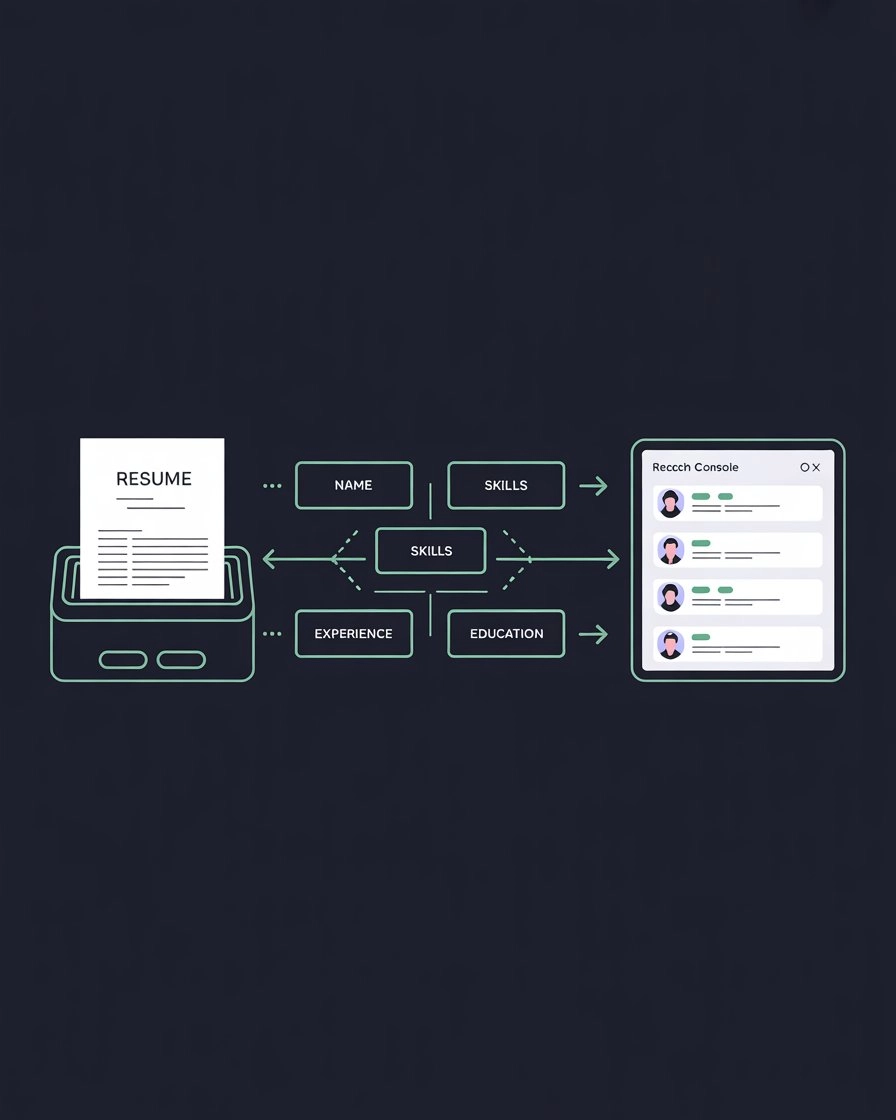
When you apply for a job online through a company website or a job portal, your CV goes into an ATS. The system extracts information from your CV and stores it in structured fields. Fields like your name, contact details, job titles, skills, education, and work history.
The main goal of an ATS from the employer's side is organisation. Instead of hundreds of CVs arriving as email attachments that a recruiter has to manually open and read one by one, the ATS stores everything in one searchable database. Recruiters can then search for specific skills or keywords and pull up the relevant candidates.
Here is the important part that most ATS guides get wrong.
At its core an ATS is not some intelligent system that judges whether you are a good candidate. It is primarily a parsing and storage tool. It reads your CV, extracts information, and stores it. If it cannot read your CV properly because of formatting problems, your information ends up in the wrong fields or missing entirely. That is when problems happen.
ATS Parser Concept
What Modern ATS Systems Are Starting to Do
This is the honest nuance that most guides skip.
Older ATS systems like early versions of Taleo were basically simple extraction tools. They pulled data from your CV and stored it. A recruiter then searched manually.
Modern platforms are more advanced. Systems like Workday and Greenhouse now include AI modules that evaluate skills alignment and career trajectory. These systems use natural language processing trained on millions of job descriptions and resumes. They understand that "Python programming," "Python development," and "Python scripting" refer to the same competency.
Greenhouse works differently from systems like Workday and Taleo. Every application in Greenhouse reaches a human reviewer. There is no match score or algorithmic ranking that auto-rejects candidates. But your resume still gets parsed into structured data that recruiters search and filter. If parsing fails, recruiters searching for your skills will not find you.
What this means practically is that the basic principles have not changed. Clean formatting, standard section names, and relevant keywords still matter and matter more than ever as systems become smarter at ranking candidates against each other.
The difference is that keyword stuffing, which means forcing keywords into your CV in ways that do not make sense, is becoming less effective as these systems get better at understanding context rather than just matching exact words.
The Most Common ATS Systems in 2026
These are the platforms most large and mid-size employers use:
Workday — used by large enterprises including many Fortune 500 companies. Has AI-powered screening and ranking built in.
Greenhouse — popular with technology companies. Does not auto-reject but parses data that recruiters search and filter. Every application reaches a human.
Taleo by Oracle — used by many large corporations and banks. One of the older systems and more sensitive to formatting issues.
iCIMS — common in healthcare and retail.
Lever — popular with mid-size technology and professional services companies.
BambooHR — common in small to mid-size businesses.
Each platform parses resumes slightly differently, which is why clean single-column formatting with standard section headings gives you the best chance across all systems.
What ATS Likes — The Simple Principles
Clean simple formatting
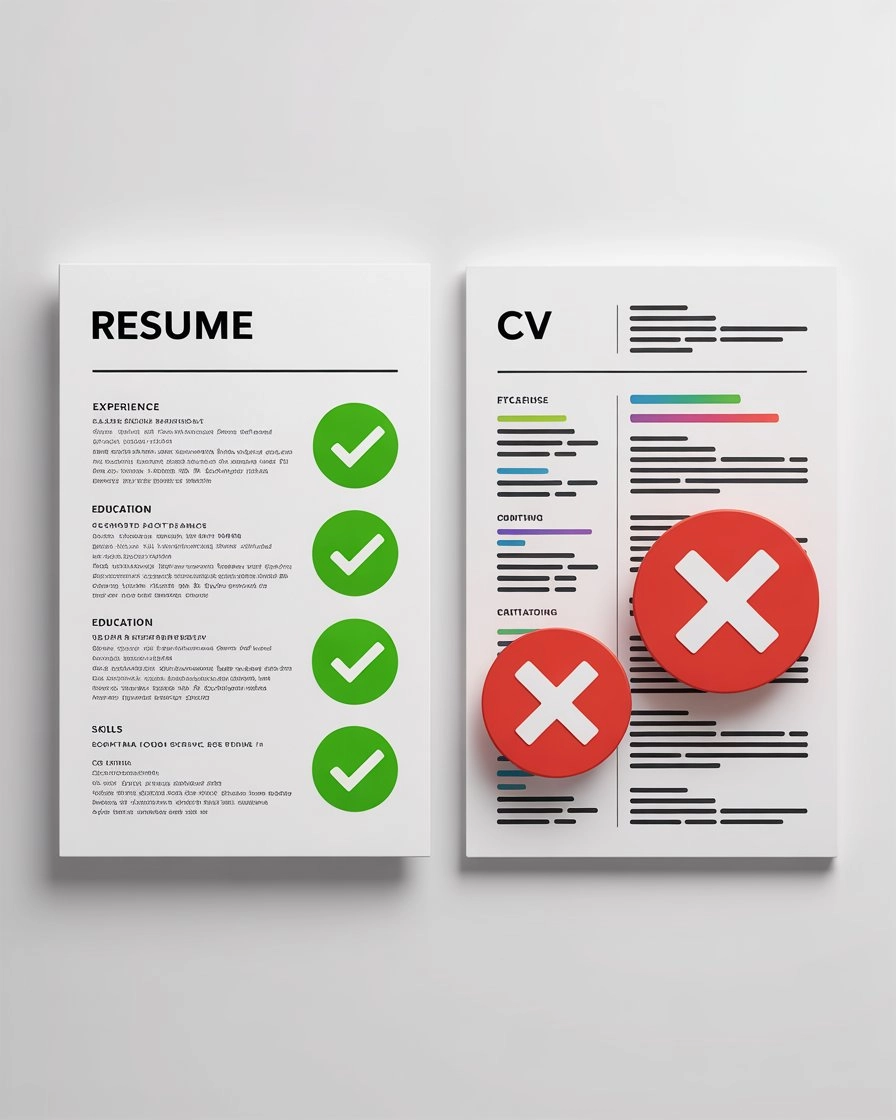
A CV that looks plain and simple on screen is often a better ATS candidate than one with beautiful design. Here is what a well-structured ATS-friendly CV looks like:
John Smith
john@email.com | +1 234 567 8900 | LinkedIn

SUMMARY
Software engineer with 5 years of experience in Python and cloud infrastructure.

SKILLS
Python | SQL | AWS | Machine Learning | Data Analysis

EXPERIENCE
Software Engineer
Company Name, City
January 2022 to Present
- Built data pipeline processing 2 million records daily
- Reduced cloud infrastructure costs by 30 percent

EDUCATION
Bachelor of Computer Science
University Name, 2019
That structure is designed according to common ATS formatting recommendations used across platforms such as Workday, Greenhouse, and Taleo, giving it the best chance of being read and stored correctly.
ATS Formatting Comparison
Standard section names
Use these exact section headings or very close variations:
- Summary or Professional Summary
- Skills or Key Skills
- Experience or Work Experience
- Education
- Certifications
Avoid creative names like My Journey, Career Adventures, or Things I Have Done. These confuse parsing software and some of your content may end up miscategorised or missed entirely.
Keywords from the job description
This is the most important practical step. Before applying to any job read the job description carefully and identify the specific skills, tools, and terms they use. If you genuinely have those skills use the same words they use.
For example if a job posting says:
Looking for a marketing specialist with SEO, Google Analytics, content marketing, and social media management experience.
A CV that says "managed online presence and helped websites grow" will be parsed as having no connection to those specific keywords.
A CV that says "managed SEO campaigns, used Google Analytics for performance reporting, executed content marketing strategy, and managed social media campaigns" contains the exact terms and will rank significantly higher in any keyword-based search or scoring.
If you are applying for jobs in specific countries, our country guides cover local CV expectations alongside ATS formatting:
What ATS Hates — The Things That Cause Parsing Failures
Text inside images
If you put your contact details or any important information inside an image, ATS cannot read it. From the system's perspective that text does not exist. Always use real text, not images of text.
Graphics, icons, and infographics
Decorative elements, icons next to your skills, visual charts showing your skill levels, and infographics are invisible to ATS parsing. The system reads text. Anything that is not text either gets ignored or causes errors in how surrounding content is extracted.
Two-column layouts
Two-column resumes are risky. Some newer parsers like Greenhouse and Lever handle them reasonably well, but older systems like Taleo and iCIMS may read columns out of order, mixing your skills section with your work history. A single-column layout is always the safer choice if you want to be confident your CV parses correctly across all systems.
Tables for important content
Many ATS parsers strip table structures entirely, leaving your content jumbled or missing. Avoid tables for any critical information like work history or skills.
Headers and footers
Most ATS platforms ignore content placed in the header or footer region of a document. Do not put your contact details only in the header. Put them in the main body of the document.
Unusual fonts
Stick to standard fonts like Arial, Calibri, or Times New Roman. Decorative and cursive fonts can cause character recognition errors during parsing, which means your text gets extracted incorrectly.
The Biggest ATS Myth — The Percentage Score
You have probably seen tools online that claim to tell you things like:
"Your CV is 72 percent ATS compatible."
These scores are mostly a marketing feature, not a meaningful technical measurement.
The tools that generate these scores are not the same as the actual ATS systems employers use. They are third-party tools simulating what they think those systems do, which varies significantly from the real thing.
A CV does not get rejected because it scored 68 percent on a third-party ATS checker. CVs get rejected or missed for these real reasons:
The skills and experience listed do not match what the employer is looking for. Keywords from the job description are absent from the CV. The CV formatting caused parsing errors that put information in wrong fields or missed it entirely. The experience level does not match what was specified.
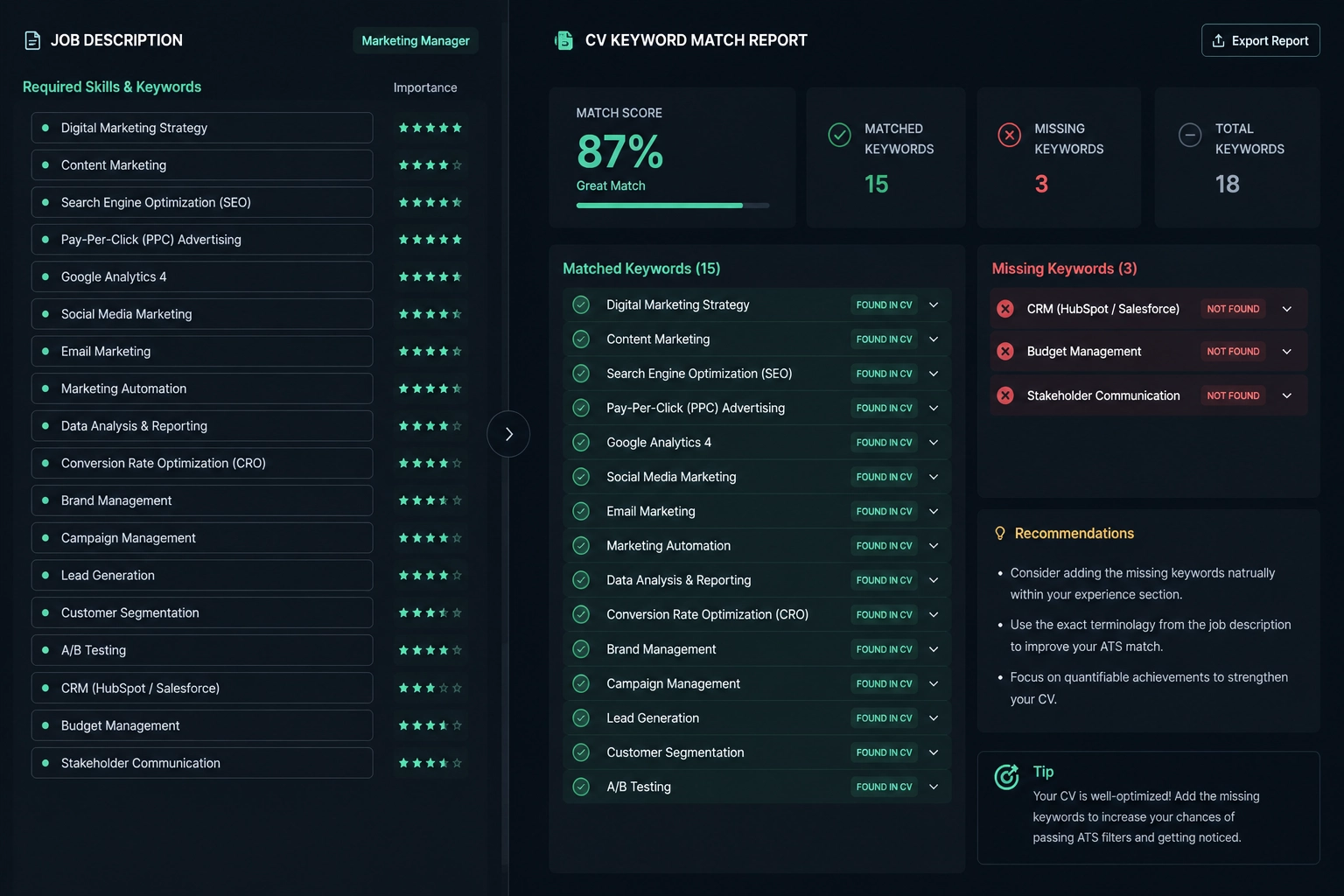
That said, the keyword gap analysis that some of these tools provide is genuinely useful. Seeing which terms from a job description are missing from your CV is helpful. Just do not take the percentage score too seriously.
Free Tools You Can Use to Check Your CV
These are real tools worth knowing about. Use them for the keyword gap analysis, not the percentage scores:
Jobscan at jobscan.co — paste your CV and a job description and it shows which keywords you are missing. The matching score is marketing but the keyword gap analysis is useful.
Resume Worded at resumeworded.com — checks formatting, section names, and keyword alignment. Has a free tier.
TopResume Free Review at topresume.com — human review of your CV with feedback on content and formatting.
Use these as a starting point, not as a final verdict. The most important check is always reading the job description yourself and making sure your genuine skills are clearly visible using the same language the employer uses.
Keyword Gap Analyzer
A Simple Step by Step Process Before Every Application
This takes five to ten minutes and makes a real difference:
First, read the job description carefully and highlight every skill, tool, technology, and qualification they mention.
Second, look at your CV and check which of those highlighted terms are already present. Not just somewhere in the document but in clear obvious places like your skills section and your experience descriptions.
Third, for any important term that is genuinely missing and that you actually have experience with, add it. Use the same phrasing the employer uses where possible.
Fourth, make sure your CV uses standard section headings, no graphics or images for important content, and a single column layout.
Fifth, save as PDF unless the employer specifically asks for a DOCX file. Most modern ATS platforms including Greenhouse, Lever, and Workday can parse standard text-based PDFs correctly. The problem arises with image-based PDFs which are scanned documents or resumes saved as flattened images. If you cannot highlight and copy text in your PDF the ATS cannot read it either.
A Real Before and After Example
Here is the same candidate applying for the same role two different ways.
The job description says:
Looking for a marketing specialist with SEO, Google Analytics, content marketing, and social media management experience.
Bad CV version:
Marketing Wizard

Helped websites grow and get more visitors.
Managed our online presence across platforms.
Worked with the team on content projects.
This version contains none of the specific keywords. An ATS scanning for SEO, Google Analytics, content marketing, or social media management will not find any of them. A recruiter searching by skill will not find this candidate.
Good CV version:
Marketing Specialist

Managed SEO campaigns increasing organic
traffic by 45 percent over 12 months.

Used Google Analytics to track performance
and report monthly to senior management.

Executed content marketing strategy across
blog and email channels reaching 20,000
subscribers.

Managed social media management across
Instagram, LinkedIn, and Facebook growing
combined following from 5,000 to 18,000.
This version contains all four keywords from the job description, uses specific numbers, and describes real work. Most ATS systems scanning for those terms will find them, and any recruiter will understand the experience immediately.
The difference is not the candidate's actual skills. It is how clearly and specifically those skills are described.
Frequently Asked Questions
Does every company use an ATS?
Not every company but most companies of any significant size do. Large corporations, multinational companies, technology companies, banks, hospitals, and government agencies almost universally use some form of ATS. Small businesses with fewer than 20 employees are less likely to use one. If you are applying through a company's online careers portal or a major job board the application is almost certainly going into an ATS.
Will a creative or designed CV hurt my chances?
It depends on the role and the company. For creative roles like graphic design or marketing where the CV itself is a portfolio piece, a designed CV can make sense. For most standard professional roles a clean simple CV is safer because it parses more reliably across different ATS platforms. If you want to show design ability put a link to your portfolio in your contact details rather than making the CV itself a design project.
Should I use the exact same words as the job description or rephrase them?
Use the exact same core terms where they accurately describe your experience. You do not need to copy the entire sentence but the specific skill or tool name should appear as the employer wrote it. Modern ATS systems with natural language processing are getting better at understanding related terms but exact matches still carry more weight in most keyword ranking systems.
Is keyword stuffing a good strategy?
No. Listing keywords in white text, hiding terms in your document, or forcing keywords into sentences where they make no logical sense is both ineffective and dishonest. Modern ATS systems are increasingly able to detect when keywords appear without context. More importantly when a human recruiter eventually reads your CV it needs to make sense and read naturally. Keyword stuffing creates CVs that pass machines but fail humans.
What file format should I use?
PDF is the safest choice for most applications. It preserves your formatting and is readable by all modern ATS platforms as long as the PDF contains real selectable text rather than a scanned image. If you are unsure whether your PDF contains real text try highlighting a word in it with your cursor. If you can highlight it the text is real and readable.
Does font size or spacing affect ATS parsing?
Font size and line spacing do not significantly affect ATS parsing. The system is reading the text content not measuring the visual presentation. What matters for parsing is that the text is real text and not embedded in images or complex formatting elements. That said readable fonts and appropriate spacing matter when a human eventually reads your CV.
How often should I update my CV for ATS?
Update your CV for each application rather than sending the same document everywhere. Different jobs emphasise different skills. A CV tailored to each job description with the relevant keywords visible in the right places will consistently outperform a generic CV across all applications.
More Guides
Continue Your Research
Explore the guides required to build the perfect CV.
Japan Work Guide
Visas, jobs, accommodation, banking, and what living in Japan actually costs. A practical guide for workers and students from Asia moving to Japan in 2026.
Gulf Work Guide
Honest guide to working in Gulf countries. Avoid scams, understand contracts, know your rights, and build a CV that gets you hired in UAE, Saudi, and Qatar.
South Korea Guide
Honest guide to South Korea. Learn about GKS scholarships, E-9 visas, Korean language reality, contract verification, and what to know before you go.
CV Toolkit
Build Your Professional CV for Free
Pick from 30+ recruiter-approved designs and start applying in minutes. 100% Free.
Cover Letter Maker
Professional matching correspondence. Build for Free.
Business Card Maker
Sleek, modern designs for authority branding. 100% Free.
100% Free • No Credit Card • No Watermarks • Instant Access