

IT Support Skills for CV
What to List (2026)
IT support is often the entry point into a technology career, and your CV needs to show that you can solve real problems, not just that you are good with computers. Hiring managers want to see specific systems, tools, and platforms you have worked with, along with evidence that you can handle user issues under pressure.
The IT support landscape has shifted heavily toward cloud-based systems, remote support, and security awareness. Employers now expect even junior help desk staff to understand Microsoft 365 administration, basic network troubleshooting, and cybersecurity fundamentals.
The skills below are what IT managers and recruiters look for when hiring support staff. Match them to your actual technical experience.
Top 10 IT Support Skills Employers Look For
Example: How These Skills Look on a Real CV
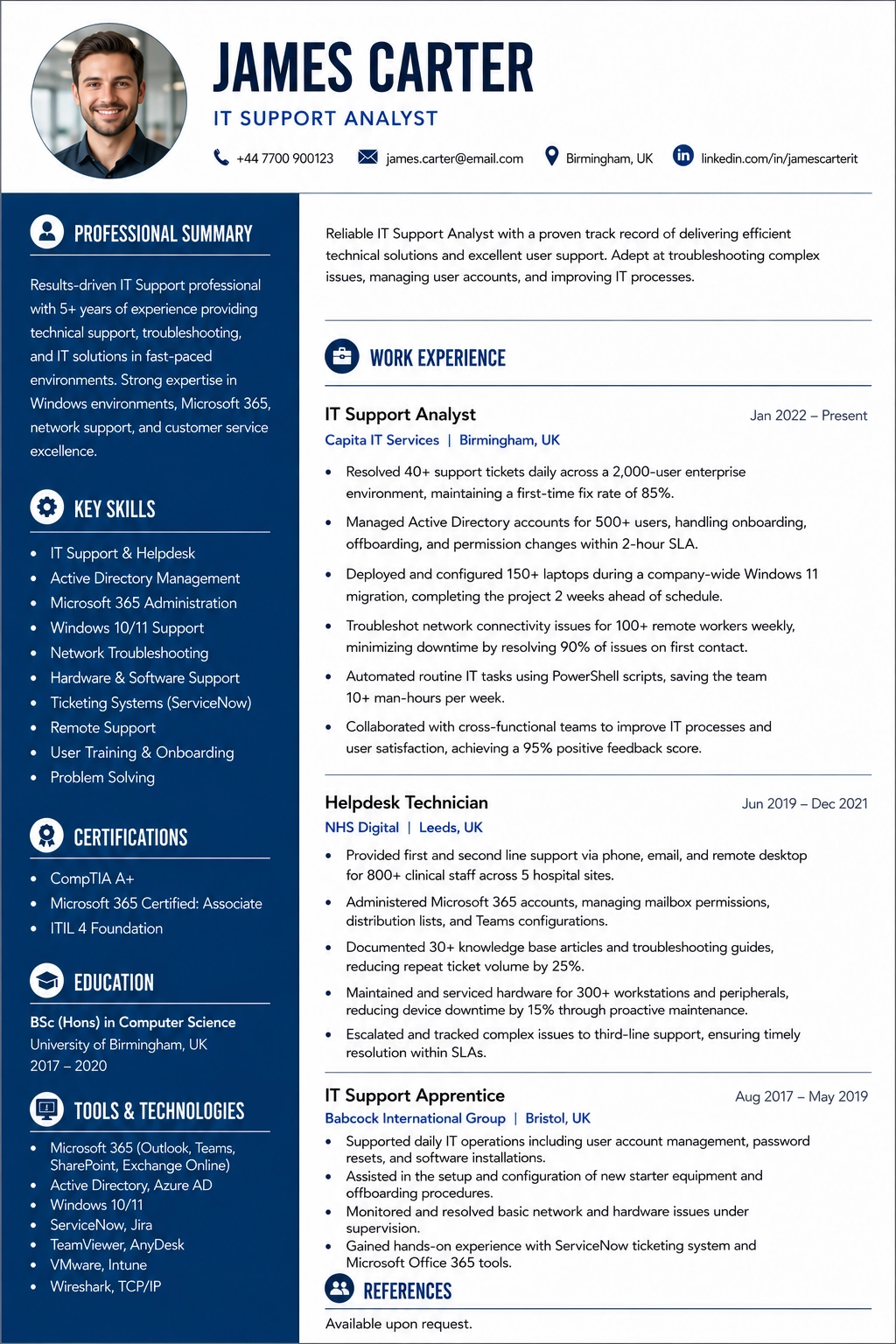
Listing skills is important, but showing how you used them in real work experience is what gets you interviews. Here is how a strong IT Support CV presents these skills.
IT Support Analyst
Capita IT Services
- •Resolved 40+ support tickets daily across a 2,000-user enterprise environment, maintaining a first-time fix rate of 85%
- •Managed Active Directory accounts for 500+ users, handling onboarding, offboarding, and permission changes within 2-hour SLA
- •Deployed and configured 150+ laptops during a company-wide Windows 11 migration, completing the project 2 weeks ahead of schedule
- •Troubleshot network connectivity issues for 100+ remote workers weekly, minimizing downtime by resolving 90% of issues on first contact
Helpdesk Technician
NHS Digital
- •Provided first and second line support via phone, email, and remote desktop for 800+ clinical staff across 5 hospital sites
- •Administered Microsoft 365 accounts, managing mailbox permissions, distribution lists, and Teams configurations
- •Documented 30+ knowledge base articles reducing repeat ticket volume by 25%
- •Maintained and serviced hardware for 300+ workstations and peripherals, reducing device downtime by 15% through proactive maintenance
Visual CV Example Template
Complete IT Support Skills List
Common ATS Keywords for IT Support
Applicant Tracking Systems scan your CV for specific keywords before a human ever reads it. Make sure these terms appear naturally in your skills section and work experience.
IT Support Skills Explained in Detail
Understanding what each skill really means helps you describe it accurately on your CV and discuss it confidently in interviews.
Hardware Troubleshooting
Hardware troubleshooting is the hands-on foundation of any IT support role. It involves systematically diagnosing problems with desktops, laptops, monitors, printers, and peripheral devices to determine whether the issue is hardware-related or software-related. A competent IT support technician follows a structured approach, starting with the most common causes and working through to component-level diagnosis. Employers expect you to handle everything from a laptop that will not boot to a printer producing garbled output, and to resolve these issues with minimal disruption to the user.
The range of hardware you encounter depends on the environment. In a corporate setting, you will work with standardised builds of business laptops, docking stations, dual monitors, VoIP phones, and networked multifunction printers. You need to be comfortable replacing RAM, swapping hard drives for SSDs, reseating cables, and running built-in diagnostics from manufacturers like Dell, HP, and Lenovo. Understanding warranty processes and knowing when to escalate to vendor support rather than attempting a repair yourself is equally important.
On your CV, go beyond simply listing hardware troubleshooting as a skill. Specify the types of equipment you have supported, the volume of devices you managed, and any migration or deployment projects you contributed to. For example, state that you diagnosed and resolved hardware faults across a fleet of 300 Dell OptiPlex workstations and 200 HP EliteBook laptops, maintaining a same-day resolution rate of 90% for priority hardware issues.
Active Directory and User Management
Active Directory is the backbone of identity and access management in most enterprise Windows environments. IT support staff use it daily to create and disable user accounts, reset passwords, manage security group memberships, and apply group policies that control what users can access across the network. Understanding the hierarchical structure of organisational units, domains, and forests is essential for anyone working in a corporate IT support role.
Beyond basic account management, competent IT support technicians understand how Active Directory integrates with other systems. This includes single sign-on configurations, Azure AD synchronisation for hybrid cloud environments, and the relationship between AD accounts and Microsoft 365 licensing. You should also understand how group policies push settings to workstations, including drive mappings, printer deployments, and security restrictions. Employers value support staff who can troubleshoot login failures, account lockouts, and permission issues without escalating every query to a systems administrator.
When presenting this skill on your CV, specify the size of the Active Directory environment you supported and the tasks you performed regularly. For example, you might state that you managed Active Directory accounts for 1,200 users across 3 organisational units, processing an average of 20 account creation, modification, and deactivation requests per week with 100% compliance to the company's joiner-mover-leaver process.
Ticket Management Systems
Ticket management systems are the operational backbone of any IT support team. Platforms like ServiceNow, Jira Service Management, Freshdesk, and Zendesk allow support staff to log user issues, categorise and prioritise them, track progress through to resolution, and maintain a complete audit trail of every interaction. Employers expect IT support candidates to be proficient with at least one major ticketing platform and to understand the workflow from ticket creation through escalation to closure.
Effective ticket management goes well beyond simply logging calls. A skilled support technician writes clear, detailed ticket notes that allow any colleague to pick up the case and continue working on it. They correctly categorise tickets by type and priority, meet response and resolution SLA targets, and use the knowledge base to link related incidents. Understanding the difference between incidents, service requests, and problems under ITIL frameworks shows employers that you grasp the operational structure behind IT service delivery.
On your CV, name the specific ticketing systems you have used and include metrics that demonstrate your efficiency. For example, state that you managed an average of 35 tickets per day in ServiceNow, achieving a first-contact resolution rate of 78% and consistently meeting the 4-hour response SLA for priority 2 incidents. Mentioning any contributions to improving ticket workflows or creating knowledge base articles adds further value.
Skills to Avoid on a IT Support CV
These generic terms appear on nearly every CV. They tell the recruiter nothing specific about your abilities and will not help you pass an ATS filter.
How to Present These Skills on Your CV
Create a Technical Skills section organized by category: Operating Systems, Networking, Software, Hardware, Tools.
Include ticket volume metrics if available: tickets resolved per day, first-call resolution rate, or average response time.
List certifications like CompTIA A+, ITIL, or Microsoft certifications with dates and expiry.
Mention the size of the user base you supported. Supporting 50 users is different from supporting 500.
Frequently Asked Questions
Do I need certifications for IT support?
Certifications like CompTIA A+, Microsoft 365 Fundamentals, or ITIL Foundation are not always mandatory but they significantly strengthen your CV, especially when competing with candidates who have more hands-on experience.
How do I show IT skills from self-taught experience?
Describe specific projects: building your own PC, setting up home networks, or managing technology for a family business. Include any home lab or virtual environment experience. Frame it professionally.
Should I include personal tech projects?
Yes, especially if you are early in your career. Setting up a home server, configuring a network, or building a website demonstrates practical skills that employers value.
How important is customer service for IT support?
Very important. IT support is as much about communication as it is about technical skill. Employers need people who can explain solutions clearly, remain patient with frustrated users, and manage expectations.
Build Your CV Free
Ready to build your CV with a properly structured skills section? Our free CV builder helps you create a professional, ATS-friendly CV with no login, no watermarks, and instant PDF download.
Related Skills Guides
CV Toolkit
Build Your Professional CV for Free
Pick from 30+ recruiter-approved designs and start applying in minutes. 100% Free.
Cover Letter Maker
Professional matching correspondence. Build for Free.
Business Card Maker
Sleek, modern designs for authority branding. 100% Free.
100% Free • No Credit Card • No Watermarks • Instant Access